If you want to enforce minimum code coverage check, JaCoCo worked really in the projects that I’ve worked on so far.
JaCoCo works as agent (there is another option where it can do offline instrumentation). The prepare-agent goal sets up the “jacocoProperty” property to setup JaCoCo as agent on the the surefire argLine (so it will only work if sure-fire is configured to run your unit tests in forked process)
Here is basic maven project that demonstrates how to check minimum line and branch coverage of 80% is met.
Prepare Agent Goal
<plugin>
<groupId>org.jacoco</groupId>
<artifactId>jacoco-maven-plugin</artifactId>
<version>0.8.2</version>
<executions>
<!-- (1) Prepare agent runs in the init phase, it setups the jacocoProperty, so we can insert this to the maven sure fire argLine and get to run jacoco as agent -->
<execution>
<id>prepare-agent</id>
<goals>
<goal>prepare-agent</goal>
</goals>
<configuration>
<propertyName>jacocoArgLine</propertyName>
<includes>
<include>com.choudhury.codecoverage.*</include>
</includes>
</configuration>
</execution>
SureFire Plugin Argline
We run sure fire and we add the “jacocoProperty” as part of the argLine
<plugin>
<groupId>org.apache.maven.plugins</groupId>
<artifactId>maven-surefire-plugin</artifactId>
<version>2.22.1</version>
<configuration>
<!-- (2) setup the argLine and run the unit tests. **NOTE the "jacocArgeLine" property was configured the "prepare-agent" goal of Jacoco (see below) -->
<argLine>${jacocoArgLine} -Xmx256m</argLine>
</configuration>
</plugin>
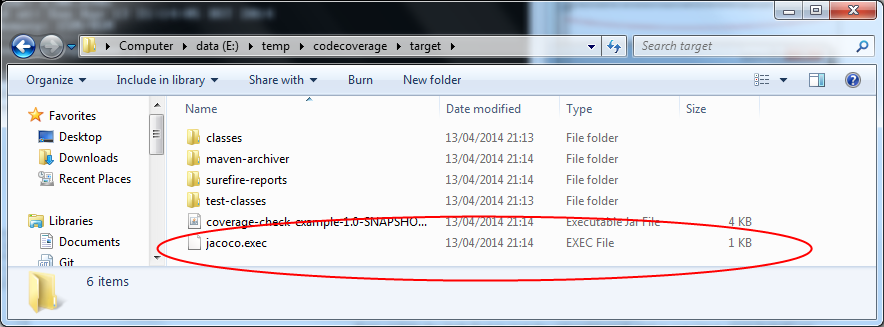
After the forked sure fire process is has completed it write the jacoco.exec file in the target file. This file is required for both the “check” and “report” JaCoCo goals.
Check Goal
In verify phase, we execute the check goal of JaCoCo
<!-- (3) the check goal by default runs in the verify phase, we want to fail the build if mimimum code coverage checks aren't met -->
<execution>
<id>check</id>
<goals>
<goal>check</goal>
</goals>
<configuration>
<rules>
<!-- All classes must have 80% line and branch coverage . Note we use 2 d.p so that we get can any check failure messages reported to 2 d.p -->
<rule >
<element>CLASS</element>
<limits>
<limit >
<counter>LINE</counter>
<value>COVEREDRATIO</value>
<minimum>0.80</minimum>
</limit>
<limit >
<counter>BRANCH</counter>
<value>COVEREDRATIO</value>
<minimum>0.80</minimum>
</limit>
</limits>
<excludes>
<exclude>com.choudhury.codecoverage.Bye</exclude>
</excludes>
</rule>
</rules>
</configuration>
</execution>
</executions>
Example Project
Example maven project can be found here
With the example project, when we run “mvn clean install” we expect to fail on code coverage checks.
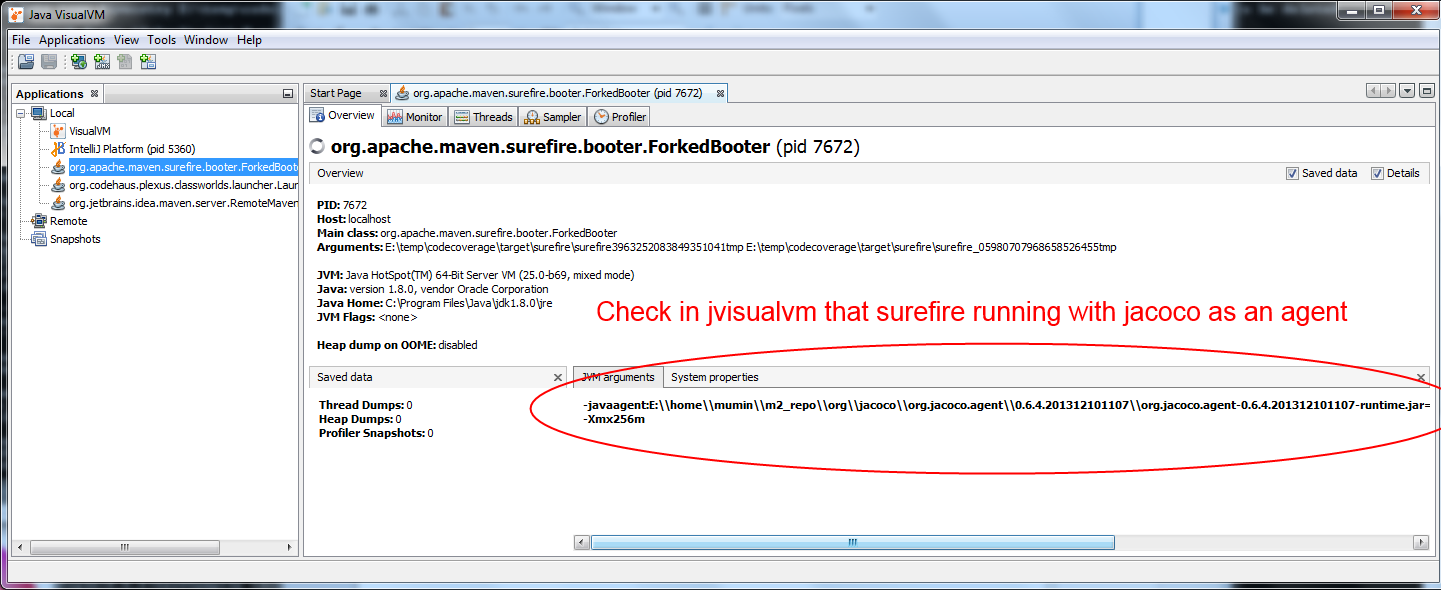
To confirm that Jacoco agent is correctly being appended to the Java argLine for maven SureFire plugin, temporarily put a long enough pause in the Unit Test (and whilst the Unit Test are running) launch jvisualvm to check that jacoco is correctly setup as an agent.
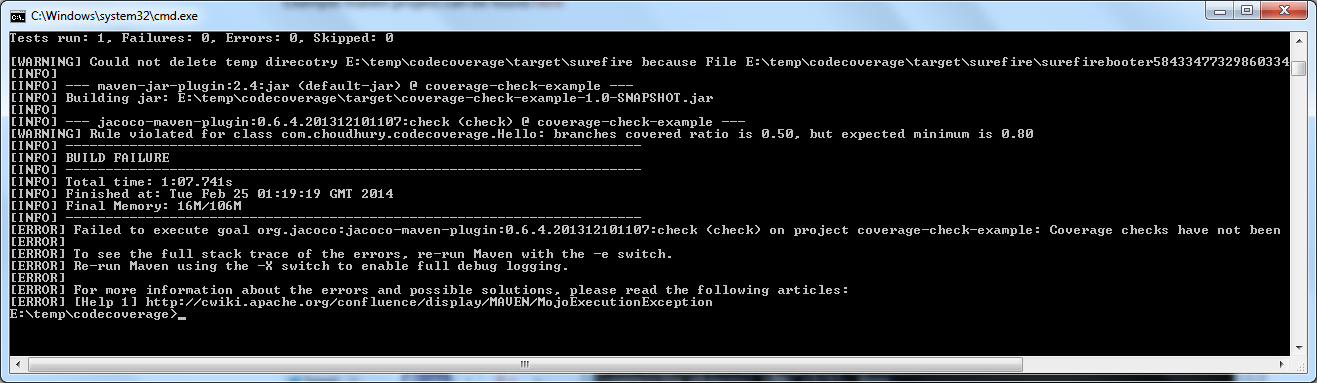
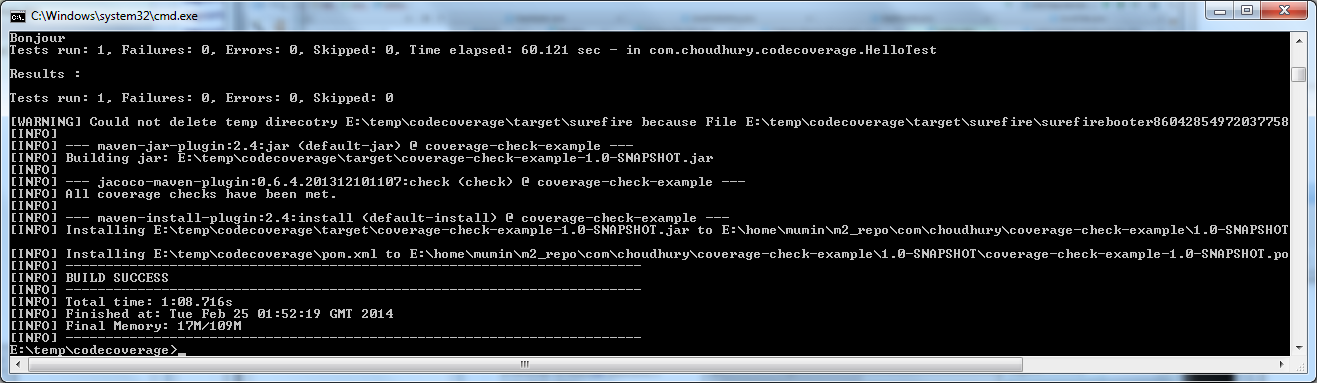
If we update the HelloTest to test the missed branch and re-run “mvn clean install” we should see the lines “All Coverage checks have been met” to appear and the the build should pass 🙂
JaCoCo Code Coverage Reports
Another nice feature of JaCoCo maven plugin is the report goal allowing you to see which lines have been covered by your tests.
Execute the report goal of the JaCoCo maven plugin
(Note : this reads the jacoco.exec file in your target folder, do make sure it’s present when you run this goal, otherwise you will get no reports produced).
The report goal should produce the html files under target/site/jacoco folder.
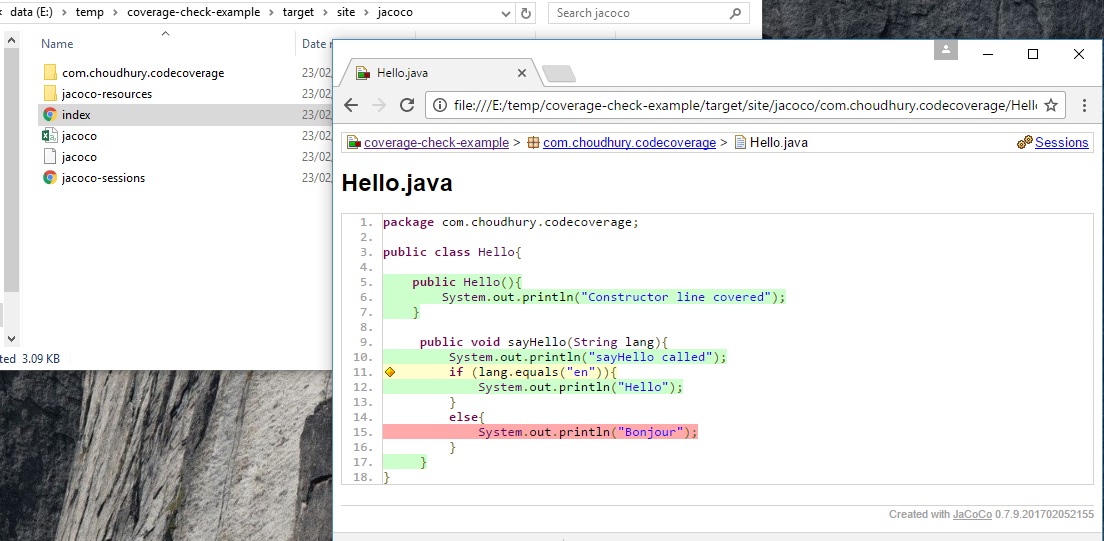
- Green shows the covered lines
- Yellow shows partially covered branches (you can hover over the diamond icon to get tooltip of how many branches covered)
- Red is the missed lines.