
I really useful online calculator I came across is Last Calc
http://www.lastcalc.com , the author has open sourced this on GitHub (it’s written in Java).
Automated Swing Testing
For testing Swing UI, Jemmy is a really great tool. Some info about this can be found at
http://wiki.netbeans.org/Jemmy
and
and this is really useful powerpoint presentation I googled across:
Here
Another great tool is Fest-Swing , this uses Robot to generate Input Simulation.
I prefer Jemmy as it provides the option of using either Event Dispatching (events are programmatically created and dispatched onto the Event Queue) or Robot (using the Robot class to control the mouse and keyboard, generating native OS events like a real user using the UI) method for input simulation.
When you run the Tests on the Continuous build system, using Event Dispatch (the default mechanism for Jemmy) , it means you don’t need to have the process running inside a logged in windows desktop (it will still work even when it’s run as windows service account). The other advantage of Event Disptaching mechanism is that you when run the automated tests on your own machine you do not have to worry about your mouse and keyboard being taken control by the automated tests.
Virtual Extension Methods
To update the existing Collections library for lamba (proposed for Java 8), another new feature proposed for Java 8 is Virtual Extension Methods.
One of the problems of using interfaces, is that you are unable to add new methods to interfaces without potentially causing problems for existing libraries that were already developed/compiled against the original interface definition. So unless you can rebuild those libraries against your updated Interface definition, you’re stuck! This is where Virtual Extension Methods will come to the rescue.
The Scenario
An interface was created by Bob.
import java.util.*;
public interface DefenderMethod{
void method1();
}
public interface DefenderMethod{
void method1();
}
Alice creates class DefenderMethodImpl that implements DefenderMethod
Now Bob wants to add a new methods to the interface, this might cause problems for Alice if she pulls in Bobs latest interfaces updates, she may get runtime errors if her class runs against against the updated interfaces, or if she re-compiles, she will get compilation errors which need to be resolved.
This is where virtual extension methods will be very useful, for methods on the interface, we can specify a default implementation for the method, this means we maintain binary and source compatibility for existing classes that were compiled against this interface. So now Bob can add new virtual extension methods to his interface without worrying about causing problems for Alice, thus preserving both binary (Alice doesn’t need to recompile) and source compatibility (Alice doesn’t need to change her code).
To implement a virtual extension method, you add “default” after the method signature, followed by the actual static method that be used as the default implementation.
import java.util.*;
public interface DefenderMethod{
void method1();
int method2(int val) default {
System.out.println("default method invoked called with args "+val);
return val+4;
}
}
public interface DefenderMethod{
void method1();
int method2(int val) default {
System.out.println("default method invoked called with args "+val);
return val+4;
}
}
If the interface (InterfaceFoo) is extended by another interface (InterfaceBar) , the default method of the extended interface (InterfaceBar) is preffered. If implementers of the class have defined the methods, these will be used in preference to the default method implementation.
How does this compare to C# Extension Method?
C# Extension Methods uses a compiler trick, the compiler when it sees you are calling an extension method (which is basically a static method whose first argument is the same type as the instance), even though the source code you write, looks like you are calling an instance method, the byte-code that is generated for this is actually a call to the static method, because this is not implemented as a VM feature, this is brittle compared to the virtual extension methods proposed for Java. The other difference is C# extension methods are only available in the site where the the extension method is imported, java extension methods will be available to all implementers of the interface.
Experimenting with Java lambda syntax
On the lambda dev forum it was announced the Java lambda syntax ( planned for Java 8 ) will be based on the C# syntax., it will use thin arrow “->” rather C#’s fat arrow “=>” . I was curious to see what Java code with lambdas will look like using Swing.
To experiment with lambda, you can use a special build of the JDK with lambda support
To compile java files using the lambda features, nake sure you using javac is taken from the bin directory of this lambda jdk build.
Below is the non lambda version of the Example – using anonymous inner classes for the ActionListener and for the Runnable.
import javax.swing.*;
import java.awt.*;
import java.awt.event.*;
public class TestInnerClass{
public static void showUI()
{
JFrame frame = new JFrame("Anonymous Inner Class Example");
frame.setDefaultCloseOperation(JFrame.EXIT_ON_CLOSE);
JButton button = new JButton("Click Me");
button.addActionListener(
new ActionListener()
{
public void actionPerformed(ActionEvent e) {
System.out.println("button clicked");
}
}
);
Container contentPane = frame.getContentPane();
contentPane.add(button, BorderLayout.CENTER);
frame.setSize(300, 100);
frame.setVisible(true);
}
public static void main(String[] args)
{
SwingUtilities.invokeLater(new Runnable() {
public void run() {
showUI();
}
});
}
}
import java.awt.*;
import java.awt.event.*;
public class TestInnerClass{
public static void showUI()
{
JFrame frame = new JFrame("Anonymous Inner Class Example");
frame.setDefaultCloseOperation(JFrame.EXIT_ON_CLOSE);
JButton button = new JButton("Click Me");
button.addActionListener(
new ActionListener()
{
public void actionPerformed(ActionEvent e) {
System.out.println("button clicked");
}
}
);
Container contentPane = frame.getContentPane();
contentPane.add(button, BorderLayout.CENTER);
frame.setSize(300, 100);
frame.setVisible(true);
}
public static void main(String[] args)
{
SwingUtilities.invokeLater(new Runnable() {
public void run() {
showUI();
}
});
}
}
The above is not very interesting, now let’s convert those inner classes to use the lambda syntax..
import javax.swing.*;
import java.awt.*;
import java.awt.event.*;
public class TestLambda{
public static void showUI()
{
JFrame frame = new JFrame("Lambda Example");
frame.setDefaultCloseOperation(JFrame.EXIT_ON_CLOSE);
JButton button = new JButton("Click Me");
button.addActionListener( (e) -> {System.out.println("button clicked");});
Container contentPane = frame.getContentPane();
contentPane.add(button, BorderLayout.CENTER);
frame.setSize(300, 100);
frame.setVisible(true);
}
public static void main(String[] args)
{
SwingUtilities.invokeLater(() -> {showUI();});
}
}
import java.awt.*;
import java.awt.event.*;
public class TestLambda{
public static void showUI()
{
JFrame frame = new JFrame("Lambda Example");
frame.setDefaultCloseOperation(JFrame.EXIT_ON_CLOSE);
JButton button = new JButton("Click Me");
button.addActionListener( (e) -> {System.out.println("button clicked");});
Container contentPane = frame.getContentPane();
contentPane.add(button, BorderLayout.CENTER);
frame.setSize(300, 100);
frame.setVisible(true);
}
public static void main(String[] args)
{
SwingUtilities.invokeLater(() -> {showUI();});
}
}
Using the lambda syntax, the code looks more concise, it has less ceremony (code that offers very little information).
Finding out where a class has been loaded from
If you need to work what location a class has been loaded from:
myclass.getClass().getProtectionDomain().getCodeSource().getLocation()
Intellij 10.5 Community Edition JNIDispatch bug
Found an issue with intellij 10.5 community edition. When you launch your application it includes it’s version of jnidispatch.dll into your programs launch path. This can cause:
java.lang.UnsatisfiedLinkError: com.sun.jna.Native.pointerSize()I
When you attempt to launch your program and you were expecting to use a different version of the jnidispatch.dll. Fix is to remove the jnidispatch.dll from your intellij distribution folder.
Troubleshooting a Java program
Useful command to know about, if you have the JDK (Java 6 update 7 or newer) installed. In the bin directory of the JDK, there is a tool called jvisualvm, to launch it, run the command
jvisualvm
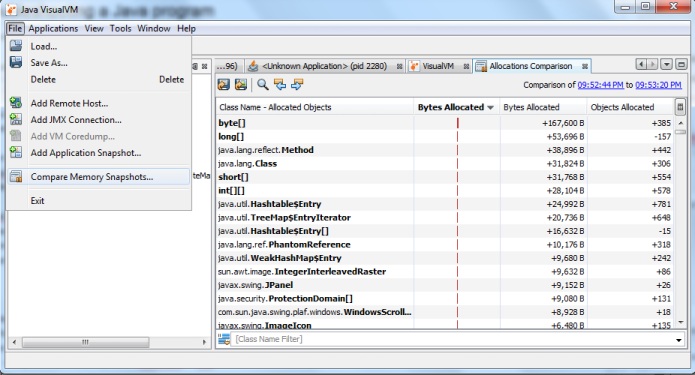
VisualVM allows to troubleshoot and profile a java application, the official guide here. JVisualVM is really handy, it has options to grab the memory/cpu snapshots and you get graphs of CPU and heap dump usage. It also has menu option called “Compare Memory Snapshots” where you can compare the visualvm memory snapshots.
Another useful command to know about, (again in the bin directory of the jdk) is jmap which you can use to get heap dumps to analyse.
jmap -dump:live,format=b,file=<filename> <PID>
Where: “live” means get only information about the live objects. “b” is specifying the dump to a binary file.
To troubleshoot memory problems, it maybe worthwhile to take a couple of heapdumps periodically so that can see what’s changing between the dumps.
The tool that I’ve used to inspect heap dumps is MAT, it has quite nice UI.
Good luck in your troubleshooting!
XStream 1.4 released
Version 1.4 of xstream has been released. This update fixes the issue with Java 7 (The java.vendor property was changed to “Oracle Corporation” in Java 7), also Android support has been added.
Using sonar in your Java Maven project
In my previous post, I went through how to get sonar up and running, now this guide is a quick how to running sonar for your java maven project.
So here is simple maven project DistanceConverter (hardly anything in this project, but enough to run sonar). If you look at the pom.xml file for this project, you will a sonar profile and some properties required for the sonar plugin. To run the sonar code metrics, you need to run
mvn clean install -Psonar sonar:sonar

The “-Psonar” activates the sonar profile and “sonar:sonar” executes the sonar goal in the sonar plugin. If your running this for the first time, expect a long wait as quite a few dependencies may need to be downloaded.
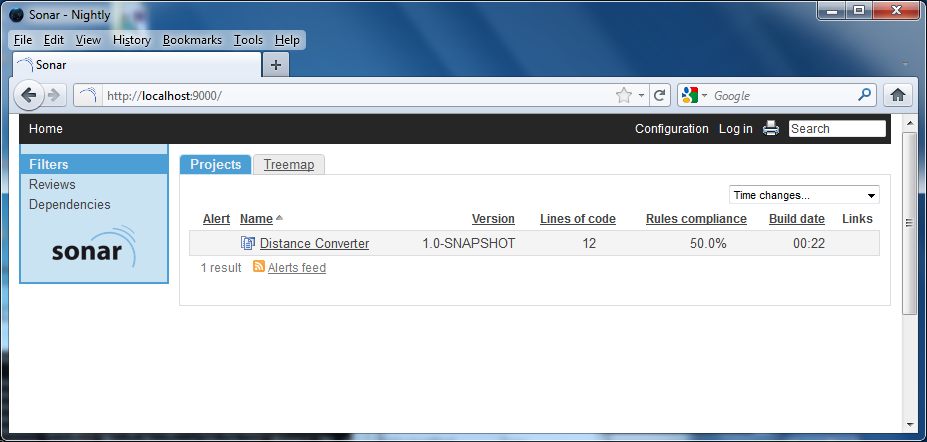
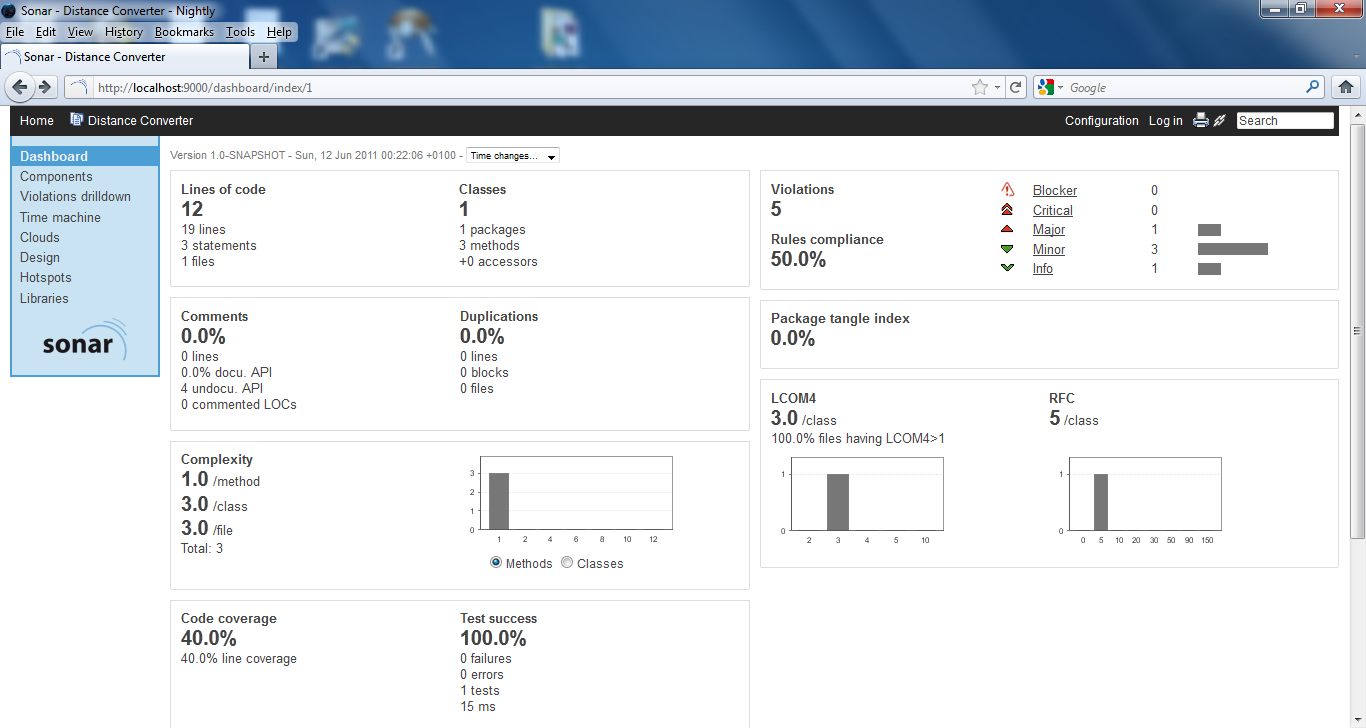
If all goes well, if you go back to the sonar webpage, you will see it’s been updated. You’ll see various metrics e.g. code coverage, the violations reported by checkstyle, pmd and findbugs.
How to debug Java Webstart application
Useful tip I came across for remote debugging java webstart application.
Run the following two lines from the command line (or from your bat file).
set JAVAWS_VM_ARGS="-Xdebug -Xrunjdwp:transport=dt_socket,server=y,suspend=n,address=4145"
javaws http://URL/JNLP_DESCRIPTOR.jnlp
javaws http://URL/JNLP_DESCRIPTOR.jnlp