JavaFX Undecorated Window Task Icon Minimize

The JavaFX undecorated window gives you a blank canvas, giving freedom to how your window looks without having to accept the default Windows title bar and buttons such as the Minimize, Maximise and Close buttons.

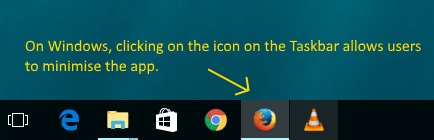
On Windows, the disadvantage of the Undecorated stage is if you click on the icon on the Taskbar, you don’t get the minimise behaviour compared to other Windows app. Likewise, if you use the keyboard shortcut “Windows Key + M” all your apps except for the Undecorated JavaFX app will minimise.

This can be quite fustrating.
There is a stackoverflow post on this issue:

http://stackoverflow.com/questions/26972683/javafx-minimizing-undecorated-stage

This answer from StackOverflow post seems to work

import com.sun.jna.Pointer;
import com.sun.jna.platform.win32.User32;
import com.sun.jna.platform.win32.WinDef;
import javafx.application.Application;
import javafx.scene.Scene;
import javafx.scene.control.Label;
import javafx.scene.layout.Pane;
import javafx.stage.Stage;
import javafx.stage.StageStyle;

import static com.sun.jna.platform.win32.WinUser.GWL_STYLE;

public class SimpleWindowApplication extends Application {


    public static void main(String[] args) {
        launch(args);
    }

    @Override
    public void start(final Stage stage) {
        Scene scene = new Scene(new Pane(new Label("Hello World")));
        stage.initStyle(StageStyle.UNDECORATED);
        stage.setTitle("Find this window");
        stage.setScene(scene);
        stage.show();
        long lhwnd = com.sun.glass.ui.Window.getWindows().get(0).getNativeWindow();
        Pointer lpVoid = new Pointer(lhwnd);
        WinDef.HWND hwnd = new WinDef.HWND(lpVoid);
        final User32 user32 = User32.INSTANCE;
        int oldStyle = user32.GetWindowLong(hwnd, GWL_STYLE);
        System.out.println(Integer.toBinaryString(oldStyle));
        int newStyle = oldStyle | 0x00020000;//WS_MINIMIZEBOX
        System.out.println(Integer.toBinaryString(newStyle));
        user32.SetWindowLong(hwnd, GWL_STYLE, newStyle);
    }
}

It uses the JNA library add the WS_MINIMIZEBOX style to the existing Window.

Dependencies required if your using gradle are

    compile 'net.java.dev.jna:jna:4.3.0'
    compile 'net.java.dev.jna:jna-platform:4.3.0'


Java 9

Java 9 modularity adds stronger encapsulation, if you attempt to run the sample program under Java 9, you’ll get IllegalAccessError as the com.sun.glass.ui package is not visible to unnamed modules

To make the example run on Java 9 you will need to add this additional VM Option
--add-exports=javafx.graphics/com.sun.glass.ui=ALL-UNNAMED

BoneCP

** Update:  BoneCP is no longer maintained **  Instead, HikariCP been proven to be a rock solid successor (and is default connection pool for Spring Boot)

Recently switched to over from using the default connection pool provided by tomcat 7 (which is a re-repackage of DBCP) to BoneCP. Why did we switch? noticed that connection pool wasn’t performing as well as we wanted, under heavy load, the synchronzied blocks that DBCP uses is a performance bottleneck.

Updating tomcat to use BoneCP datasource is answered in this stackoverflow post.

Set the “type” to the BoneCPDataSource (we take advantage of the fact, tomcat supports javax.sql.DataSource out of the box) and the “factory” needs to the Tomcat provideded BeanFactory implemenation.


Enforcing Minimum Code Coverage

If you want to enforce minimum code coverage check, JaCoCo worked really in the projects that I’ve worked on so far.

JaCoCo works as agent (there is another option where it can do offline instrumentation). The prepare-agent goal sets up the “jacocoProperty” property to setup JaCoCo as agent on the the surefire argLine (so it will only work if sure-fire is configured to run your unit tests in forked process)

Here is basic maven project that demonstrates how to check minimum line and branch coverage of 80% is met.

Prepare Agent Goal

<plugin>
        <groupId>org.jacoco</groupId>
        <artifactId>jacoco-maven-plugin</artifactId>
        <version>0.8.2</version>
       
         <executions>

           <!--  (1)  Prepare agent runs in the init phase, it setups the jacocoProperty,  so we can insert this to the maven sure fire argLine and get to run jacoco as agent -->
          <execution>
            <id>prepare-agent</id>
            <goals>
              <goal>prepare-agent</goal>
            </goals>
            <configuration>
              <propertyName>jacocoArgLine</propertyName>
              <includes>
                <include>com.choudhury.codecoverage.*</include>
              </includes>
            </configuration>
          </execution>

SureFire Plugin Argline

We run sure fire and we add the “jacocoProperty” as part of the argLine

 <plugin>
        <groupId>org.apache.maven.plugins</groupId>
        <artifactId>maven-surefire-plugin</artifactId>
        <version>2.22.1</version>
        <configuration>
            <!-- (2)  setup the argLine and run the unit tests.   **NOTE the "jacocArgeLine" property was configured the "prepare-agent" goal of Jacoco  (see below) -->
            <argLine>${jacocoArgLine} -Xmx256m</argLine>
        </configuration>
      </plugin>

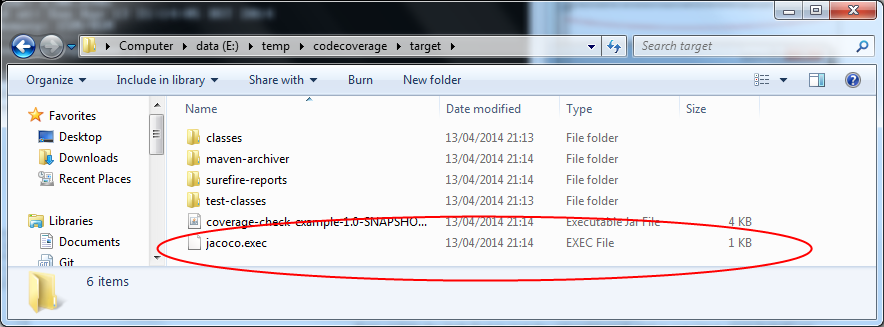
After the forked sure fire process is has completed it write the jacoco.exec file in the target file. This file is required for both the “check” and “report” JaCoCo goals.

jacoco_coverage_file

Check Goal
In verify phase, we execute the check goal of JaCoCo

          <!--  (3) the check goal by default runs in the verify phase, we want to fail the build if mimimum code coverage checks aren't met -->
          <execution>
            <id>check</id>
            <goals>
              <goal>check</goal>
            </goals>
            <configuration>
              <rules>
                <!-- All classes must have 80% line and branch coverage . Note we use 2 d.p so that we get can any check failure messages reported to 2 d.p  -->
                <rule >
                  <element>CLASS</element>
                  <limits>
                    <limit >
                      <counter>LINE</counter>
                      <value>COVEREDRATIO</value>
                      <minimum>0.80</minimum>
                    </limit>
                    <limit >
                      <counter>BRANCH</counter>
                      <value>COVEREDRATIO</value>
                      <minimum>0.80</minimum>
                    </limit>
                  </limits>
                  <excludes>
                    <exclude>com.choudhury.codecoverage.Bye</exclude>
                  </excludes>
                </rule>
              </rules>
            </configuration>
          </execution>
        </executions>

Example Project

Example maven project can be found here

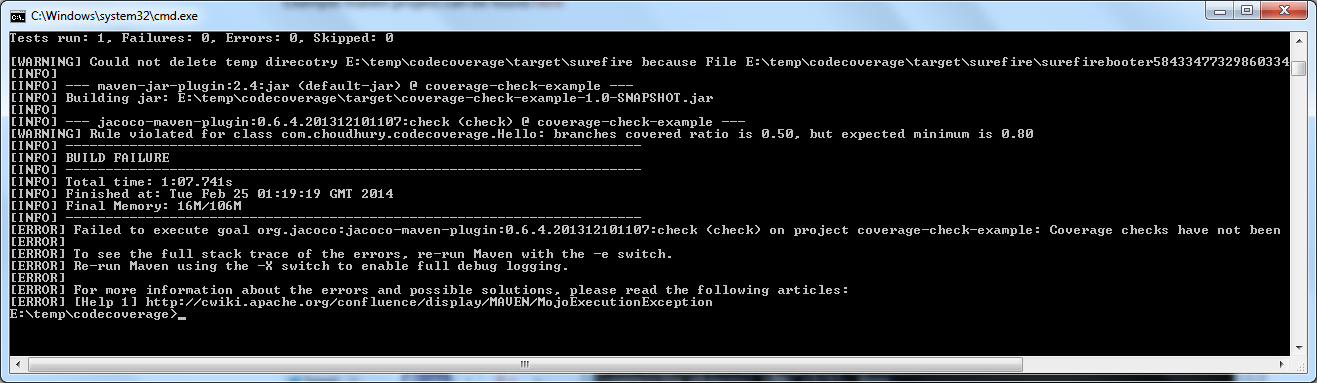
With the example project, when we run “mvn clean install” we expect to fail on code coverage checks.

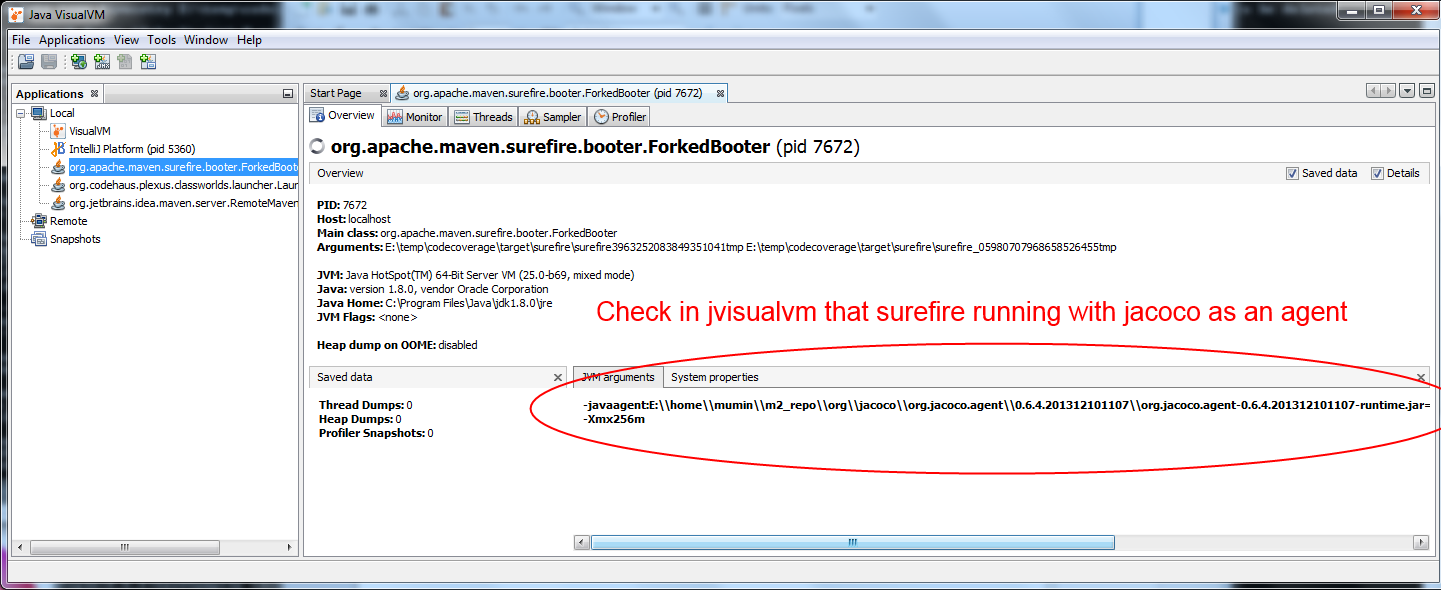
To confirm that Jacoco agent is correctly being appended to the Java argLine for maven SureFire plugin, temporarily put a long enough pause in the Unit Test (and whilst the Unit Test are running) launch jvisualvm to check that jacoco is correctly setup as an agent.

jacoco_run_as_agent

min_check_failed

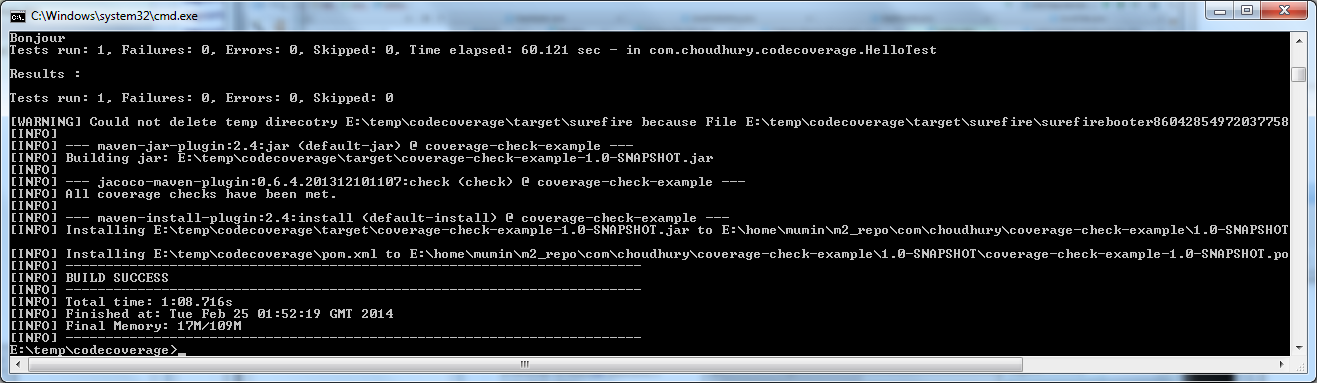
If we update the HelloTest to test the missed branch and re-run “mvn clean install” we should see the lines “All Coverage checks have been met” to appear and the the build should pass 🙂

min_check_passed

JaCoCo Code Coverage Reports

Another nice feature of JaCoCo maven plugin is the report goal allowing you to see which lines have been covered by your tests.

Execute the report goal of the JaCoCo maven plugin

mvn jacoco:report

(Note : this reads the jacoco.exec file in your target folder, do make sure it’s present when you run this goal, otherwise you will get no reports produced).

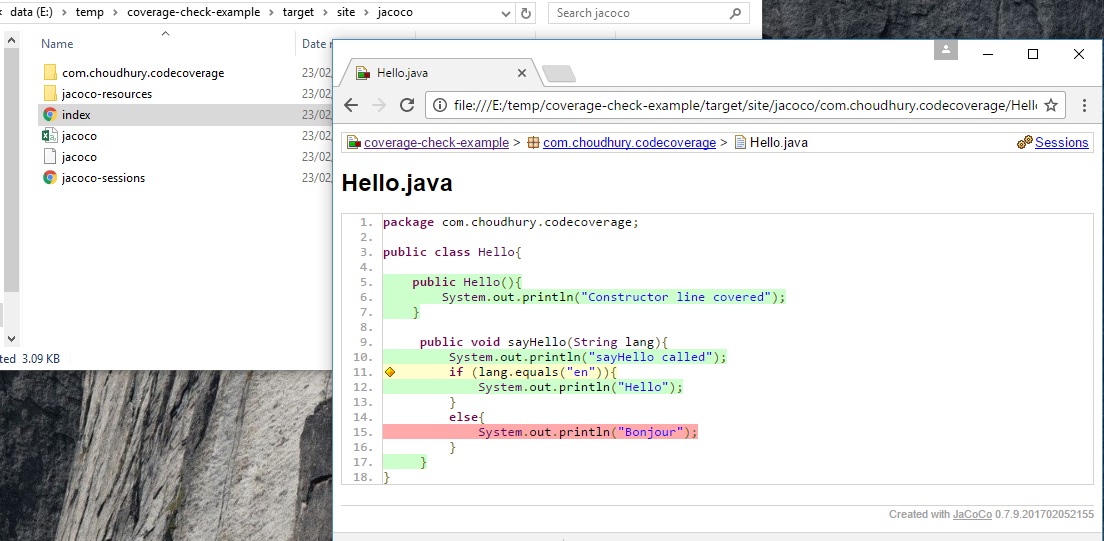
The report goal should produce the html files under target/site/jacoco folder.

  • Green shows the covered lines
  • Yellow shows partially covered branches (you can hover over the diamond icon to get tooltip of how many branches covered)
  • Red is the missed lines.

Java 8 Streams Intro

One of the cool new features in upcoming Java 8 release is the update to the the Collections API with the new Streams API.

Say if I have a Project class with an isCompleted method. If want a list of all completed projects. Now I want to retrieve a list of projects that have been completed.

Using Java 6 I could do this….

List<Project> completedProjects=new ArrayList<Project>();
for (Project project : allProjects) {
    if (project.isCompleted()) {
        completedProjects.add(project);
    }
}

The above is correct and would work, few criticism of this way, many people (especially with functional language background) would argue its very verbose for what it’s doing, the problem that I’m trying to solve is just to get the released projects – ( do I need to specify it needs to be done in a loop?).

So a few issues with the above

  1. Have to do the filtering using a loop, is something I shouldn’t have to decide, instead I should delegate it to library to decide the best implementation
  2. The looping used above is sequential, so doesn’t take advantage of multi-cores in todays machines
  3. Being pedantic, I had to mention the the type “Project” 3 times in this simple code (ok, with Java 7 Diamonds you could reduce it to 2).

The Java 8 Way of doing this would be..

List<Project> completedProjects = allProjects.stream()
    .filter(project -> project.isCompleted())
    .collect(Collectors.toList());

Now the stream library is free to decide if it’s going to use sequential loop or use some clever algorithm to best use the CPU on the machine. i also like the fact, I only have to mention the type “Project” once in all of this.

What confused me at first, is why the .collect is required the end. The way I think about this, is that Stream API could be applying the filter in parallel, so you need a collector at the end to pickup all of those results from the filters and place them into the result list.

The neat thing about the streams, is that you add other stuff onto the pipeline, say, I want to get the sorted list of completed projects…

List<Project> completedProjects = allProjects.stream()
    .filter(project -> project.isCompleted())
    .sorted()
    .collect(Collectors.toList());

SecureRandom is very slow when large number of files in java.io.tmpdir

Working on application that took a long to startup. Upon investigation, it turns out the issue is SecureRandom is using “java.io.tmp” directory to set up some entropy (the temp directory on this machine had thousands of files – no wonder it was slow!!).

Work round for Java 6 was to clear files from the temp directory.

http://bugs.sun.com/view_bug.do?bug_id=6705872

According to the bug report, this issue is fixed in Java 7 and will at most use 1024 files.

Creating videos in Java

I was looking into various options in dynamically creating a video in Java and came across xuggler, it’s really cool and it works works nicely in a maven project. The recent updates to the library means you don’t have to install the binaries before you run your Java program.

I had to use this repository below to pull down the artifact as it wasn’t hosted on Maven Central.

<repository>
    <id>xuggleRepository</id>
    <name>Xuggle Repository</name>
    <url>http://xuggle.googlecode.com/svn/trunk/repo/share/java</url>
</repository>

Getting Java HTTP Requests to appear in Fiddler

Fiddler is a handy tool to inspect http request/responses. When Fiddler starts-up by default it sets itself up to act as the proxy so any libraries that uses WinInet will have their http calls proxyied through Fiddler. For Java programs however you will need to instruct it to use Fiddler as a proxy if you want to see the calls in Fidder.

The properties you need to launch your Java application with, are:

-Dhttp.proxyHost=localhost -Dhttp.proxyPort=8888

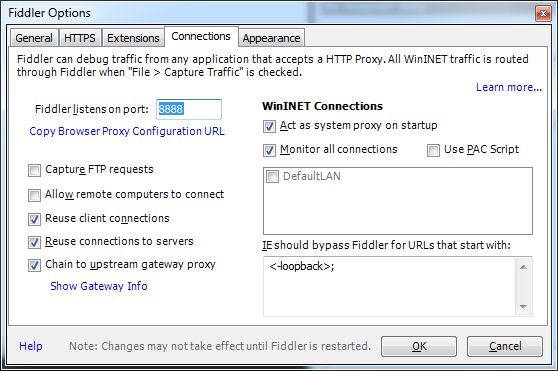
Where 8888 is the default port that fiddler sets itself up, you can check this in Fiddler through Tools -> Fiddler Options

Refer to this StackOverflow post for more details

Few things to note :

  1. the above properties will work if you are using the standard Java libraries for making http requests. If you are using any other libraries for this (e.g. Commons HttpClient), then you’ll have to check if they have a different way of setting the proxy configurations.
  2. Secondly, requests for localhost for someone reason I can’t get them to go via the proxy (I guess the standard Java libraries has special rule for localhost). The work-round I had to employ is to use localhost. (note the dot after localhost this isn’t a typo )

If your using RestTemplate in conjunction with CommonsClientHttpRequestFactory (which uses Apache HttpClient underneath) then you need to set the HostConfiguration with proxy configuration. This blog I came across to describe the spring updates to do this

Google Nexus 7 Tablet

Really looking forward to receiving my pre-order for Google Nexus 7 tablet, at 7 inch with 1280 * 800 resolution, quad core NVidia Tegra 3 Cpu with 12 Core GPU and at 340g, along with the updated 4.1 Jelly Bean OS, Early techrader preview sounds positive, I think google are onto a winner. Shame that it doesn’t come with a micro-sd slot and the shipping is 2-3 weeks 🙁

Waffle

A very useful open source project I stumbled up on is waffle a Windows active directory authenication framework for C#/Java.